
Start with a category ابدأ من هنا
Home Guides, Storage and closet guides
How to Organize Charger Cables on Your Desk and Nightstand
04
Nov
Nov
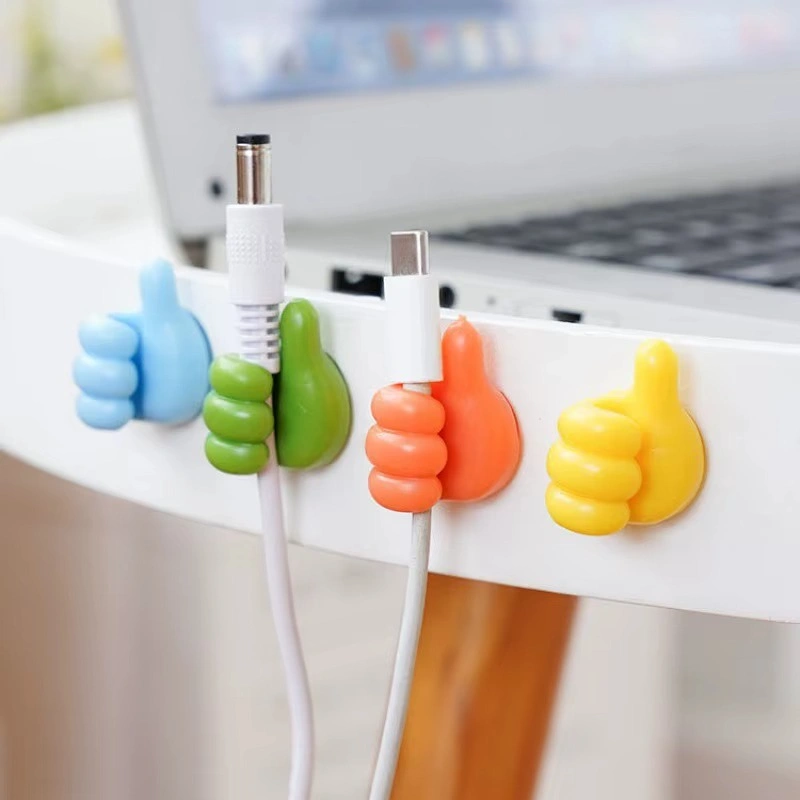
Quick answerGive every cable a fixed spot. Stick a silicone cable clip on the edge of the desk or nightstand, rest the cable end in it, and give each device its own clip colour. Cables you carry out of the house go in a small cable organizer bag, so the desk only holds what lives there.
In this guide
Why cables end up on the floor
A charging cable has no home. You unplug the phone, let go of the cable, and its own weight pulls it off the desk or down behind the bed. By night you are on your knees with the phone torch, reaching between the wall and the mattress. Add a laptop charger, earphones, a mouse cable and a power bank, and the desk turns into a knot.
The fix is not more space. It is a fixed point for the end of every cable, right where your hand reaches for it. That is exactly what a cable clip does.
From Cairo HubsSilicone Cable Organizer Clips, 10 Pieces Original price was: 124 EGP.95 EGPCurrent price is: 95 EGP.Add to cartView product
Map your cables first
Before you stick anything, spend two minutes listing what you charge and where. Most Egyptian homes have the same hot spots:
- The desk: laptop charger, mouse or keyboard cable, headphone cable, phone charger
- The nightstand: phone charger, and sometimes a second one for a watch or earphones
- The TV corner: receiver cable and the controller charger
- The kitchen counter: kettle and blender cords
Count the cables in each spot. That number tells you how many clips each place needs, and with 10 clips in a set you can usually cover the desk, both sides of the bed and one more corner.
Set up cable clips step by step
- Clean the surface. Wipe the edge of the desk or nightstand with a dry cloth. Dust is the main reason adhesive lets go, and in Cairo dust settles fast.
- Pick the right edge. Stick the clips on the front or side edge, close to where you sit or lie down, not at the back near the wall where cables fall.
- Press and hold. Peel the backing, place the clip and press it firmly for a few seconds so the double sided adhesive grips the surface.
- Give each device a colour. The clips come in mixed colours. Keep one colour for the phone, one for the earphones, one for the laptop, and use the same colours in every room.
- Rest the cable end in the clip. Leave the connector just above the clip so you can pick it up with one hand and drop it back the same way.
- Tidy the slack. Let the rest of the cable run down behind the furniture so only the end shows.
Tip: Put the clip for your phone charger on the side of the nightstand closest to your pillow. You can plug the phone in at night without turning on the light.
Room by room ideas
Home office or study desk. Line up three or four clips along the front edge: laptop, mouse, headphones, phone. Students who move between the desk and the bed will find every cable where they left it. Keep the lamp or fan cable on the side edge so the front stays clear.
Bedroom. One clip on each nightstand ends the nightly question of whose charger fell behind the bed. If siblings share a room, the colours make it clear which cable belongs to whom.
Living room. Stick a clip on the side of the TV unit for the controller charger and another for the receiver cable. Nobody trips on loose cords, and the TV corner looks calmer.
Kitchen. Kettle and blender cords tend to hang over the counter edge. A clip on the wall tiles or the side of a cupboard keeps them up and away from water. Make sure the surface is smooth and dry before sticking.
Cables you take outside
Clips work for cables that live in one place. The cables you carry every day, the spare charger, the power bank, the earphones, need a different home. Loose in a backpack, they knot around each other, and sooner or later you buy a new charger because you cannot find the old one.
A small cable organizer bag handles that side. Each item gets its own spot, the bag fits in a backpack or laptop bag, and the water resistant material protects your chargers on a rainy day or next to a leaking water bottle. Keep it packed and you leave the house with everything in one grab.
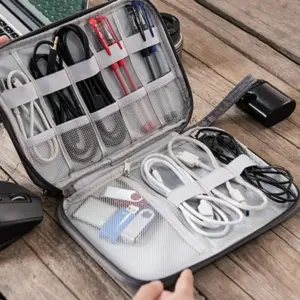
From Cairo HubsWaterproof Cable and Charger Organizer Bag Original price was: 267 EGP.205 EGPCurrent price is: 205 EGP.Add to cartView product
Keep it tidy every week
- When you buy a new device, give its cable a clip the same day
- Once a week, wipe the clips and put back any cable that wandered
- Throw away dead cables instead of keeping them for a day that never comes
- Keep the travel charger in the bag, never on the desk
For more ideas on shelves, wardrobes and drawers, read our full storage and closet organization guide. You can also browse more everyday helpers in Smart Tools.
Questions people ask
Where do you stick cable clips on a desk?
On the front or side edge of the desk, close to where you sit. That keeps the cable end within reach and stops it falling behind the desk.
What surfaces do silicone cable clips stick to?
Any smooth surface, such as a desk, a nightstand, a TV unit or wall tiles. Wipe it dry first and press the clip for a few seconds.
How many cable clips do I need?
One per cable you use in that spot. A set of 10 usually covers a desk, two nightstands and one more corner of the home.
How do I stop chargers tangling in my backpack?
Keep them in a cable organizer bag where each charger, cable and power bank has its own spot.
Does Cairo Hubs deliver across Egypt?
Yes, to every governorate. Delivery is 80 EGP and free on orders over 1,000 EGP.

 Storage & Organization
 Kitchen & Dining
 Mugs & Drinkware
 Travel & Lunch Boxes
 Ramadan
 Cleaning & Laundry
 Bathroom
 Bedroom & Living
 Decor & Lighting
 Office & Study
 Kids & Toys
 Winter Slippers
 Smart Tools
 Tools & Repairs
 Car Accessories
 Health & Beauty
 Sports & Fitness